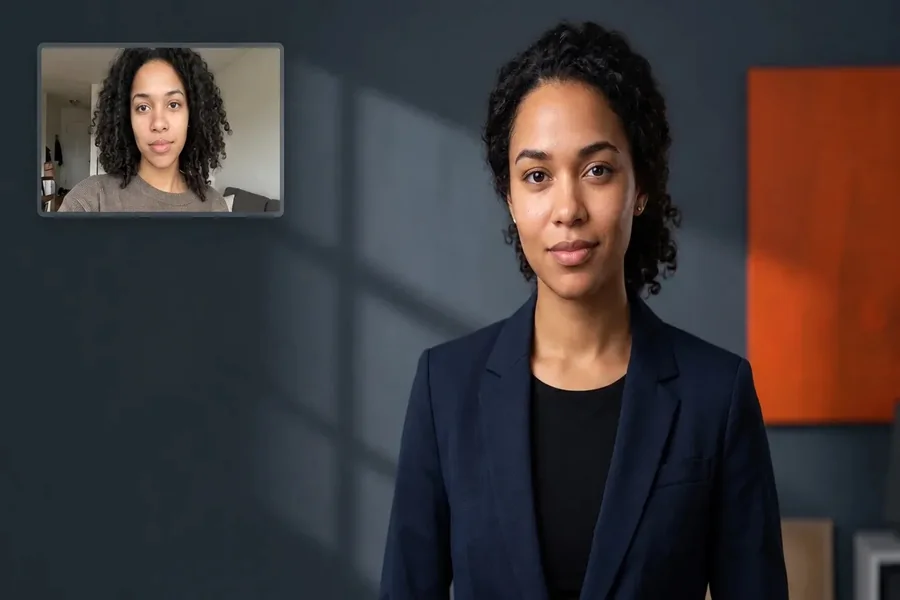
An AI headshot generator for remote teams lets each person upload their own photos so everyone gets matching, professional headshots without a group shoot. Adobe Firefly’s headshot generator helps you keep lighting, framing, and style consistent from each person’s reference photo, and enterprise customers get IP indemnification for Firefly content.
When your team is spread across time zones, getting everyone in front of the same photographer is close to impossible. The result is a team page full of mismatched crops, different backgrounds, and outdated photos. AI headshot tools fix that by letting each employee contribute photos from wherever they are, then producing headshots with a shared look. For a whole remote team, though, quality is only part of the decision. You’ll also want admin controls, bulk pricing, and security credentials that satisfy IT and legal.
Table of Contents
ToggleWhat Are the Best AI Headshots for Teams and Enterprise Companies?
The best AI headshots for teams and enterprise companies combine consistent results with tools that make rollout easy. The table below compares three options.
| Platform | Best for | Key details |
| Adobe Firefly | Teams that want creative control and Adobe workflows | Consistent lighting, posture, and framing from reference photos; choice of AI models; Firefly model output safe for commercial use; IP indemnification for enterprise customers; free daily generations with paid plans for higher volume |
| Aragon | Companies that need formal compliance documentation | SOC 2 Type II compliant; admin dashboard with multiple admins; standardized attire and background; bulk downloads; custom bulk pricing |
| BetterPic | Teams that want human retouching built in | SOC 2 Type II compliant; team dashboard for tracking and downloads; credits for AI and human edits; delivery in under an hour per person |
Firefly works person by person rather than through a team dashboard, so it fits best when a designer or marketing lead manages the look directly.
AI Professional Headshot Generator for Teams: Batch Upload and Pricing for a Remote Team in 2026
An AI professional headshot generator for teams usually handles batch upload by inviting each remote team member to upload their own photos, rather than one person uploading everyone’s selfies. Admins then track progress and download finished headshots in bulk.
Dedicated team services typically charge per person, with volume discounts for larger groups. Aragon offers custom pricing for bulk purchases, and BetterPic sells per-user and team-pack options.
Firefly’s pricing works differently. Each person can create headshots with a free Adobe account, which includes daily generations, and paid Firefly plans add higher-volume generation. For companies already on Adobe plans, that can keep headshots inside an existing workflow. In every case, ask vendors about minimums, refund terms, and whether unused credits expire.
Company Headshots: Team Bulk Pricing and SOC 2 Security
For company headshots, team bulk pricing gets the attention, but SOC 2 security often decides the purchase. SOC 2 is an independent audit of how a vendor protects customer data, and many IT and procurement teams require it for any tool that handles employee photos.
Aragon states that it is SOC 2 Type II compliant, audited by Prescient Security. BetterPic also lists SOC 2 Type II compliance on its team pages.
Beyond certification, ask how long photos are stored, who can see them, and whether they’re used to train shared models. Aragon notes that only team admins can view every member’s headshots. Adobe states that it does not train Firefly on customer content and doesn’t claim ownership of content created with Firefly.
How to Roll Out an AI Headshot Generator for Companies and Teams
Rolling out an AI headshot generator for companies and teams goes smoothly with a short plan.
Set the style first: Choose one background, attire guideline, and crop for everyone. Team platforms let admins lock these settings, and in Firefly you can reuse the same prompt and lighting settings.
Collect consent: Explain where headshots will appear and let each person approve their final image.
Share photo tips: Ask for clear, recent, well-lit photos with a neutral expression.
Review for likeness: Make sure each headshot still looks like its owner before publishing.
Plan updates: Add new hires with the same settings, and remove headshots promptly when people leave.
FAQ
How do we keep a remote team’s headshots consistent?
Standardize the background, attire, framing, and lighting for everyone. Firefly highlights consistent lighting, postures, and framing across headshots, and team platforms like Aragon let admins set attire and backgrounds for the whole team.
Can we use AI headshots on our company website commercially?
Adobe says content generated with Firefly models in the headshot generator is safe for commercial use, and it offers IP indemnification for enterprise customers. If you use a partner model, check its terms for your project.
Do employees need to approve their AI headshots?
It’s best practice. Asking for consent and approval builds trust, avoids awkward surprises, and makes sure every headshot accurately represents the person it shows.